Subscriptions shipped in 2.0.0 and are off by default. With the setting off the plugin behaves exactly as 1.9.0: no product fields, no My Account tab, no admin UI, no subscription webhook handling. The overview of what it does and does not do is on Paddle subscriptions for WooCommerce; this page is the how-to.
Turning it on
Go to WooCommerce → Settings → Payments → Paddle, scroll to the Advanced section and tick Subscriptions — Sell recurring products billed by Paddle. Save. The setting's one-line description links to this guide and its help tip covers the details; it is also described on the Configuration page with the rest.
Saving with the box ticked does three things:
- Adds a Billing field to the Paddle tab of simple products.
- Adds a Subscriptions tab to My Account, shown only to customers who have one.
-
Registers the eight
subscription.*events on your existing Paddle webhook, so there is nothing to re-register. See Webhook events.

Making a product recurring
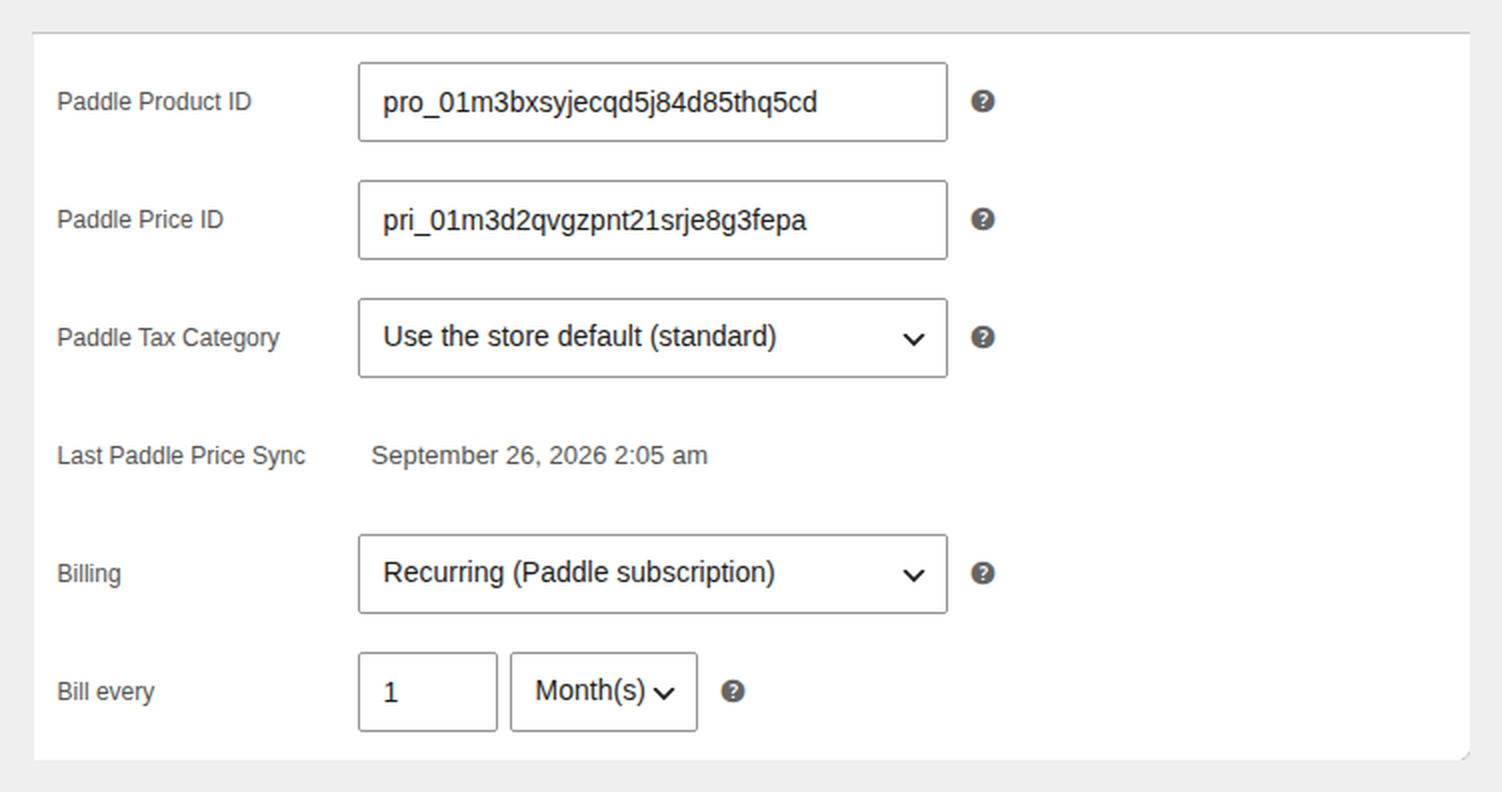
Open a simple product that is marked Virtual, give it a regular price, and open the Paddle tab of the Product data box.
- Billing — One-time (the default) or Recurring (Paddle subscription).
- Bill every — one row: a whole number from 1 to 365, then Day(s), Week(s), Month(s) or Year(s). "Bill every [3] [Month(s)]" bills quarterly.
Both fields have a help tip that explains them in place.
A product is either one-time or recurring, never both; to sell the same thing both ways, create two products. The fields are only shown for simple virtual products. On a variable product, or one that needs shipping, the tab shows a note instead, and saving Recurring on such a product is refused with a notice. Saving Recurring on a product with no regular price is refused too.
Syncing
Sync the product as usual (Sync with Paddle from its row, the bulk action, or auto-sync). For a recurring product the plugin creates a Paddle price with a billing cycle instead of a one-time price. Nothing else about product sync changes.
Paddle cannot change a price's type or billing cycle once it exists. So when you switch a product between one-time and recurring, or change its cycle, the next sync archives the old Paddle price and creates a new one, and the product's stored Paddle Price ID changes. Subscriptions that already exist keep renewing on the archived price at Paddle, at the interval and amount the customer signed up for; only new purchases use the new price. A plain price change on a recurring product updates the existing price as before.
Checkout
The customer pays in the Paddle checkout on the order-received page, exactly as for a one-time order, in both pricing modes and on both the classic and block checkout. Because the synced price is recurring, Paddle creates the subscription and the plugin stores its ID on the order once the payment webhook arrives.
Paddle is not offered at checkout when the cart:
- holds recurring items with more than one billing interval — Paddle creates one subscription per checkout, so every recurring line in a cart must share the same cycle. One-time items alongside recurring ones are fine.
- holds a recurring product that has not been synced yet.
- holds a product of the WooCommerce Subscriptions type (
subscriptionorvariable-subscription) — that extension is not compatible and not needed. - has a coupon reducing a recurring line. A recurring line is always billed at its synced Paddle price, so the classic checkout shows "Coupons cannot be applied to subscription products. Remove the coupon to pay with Paddle." Coupons on one-time lines still work in Order total mode.
These rules sit on top of the ordinary availability rules. On the block checkout the gateway is hidden for the same reasons, but no reason text is shown yet.
What the customer sees
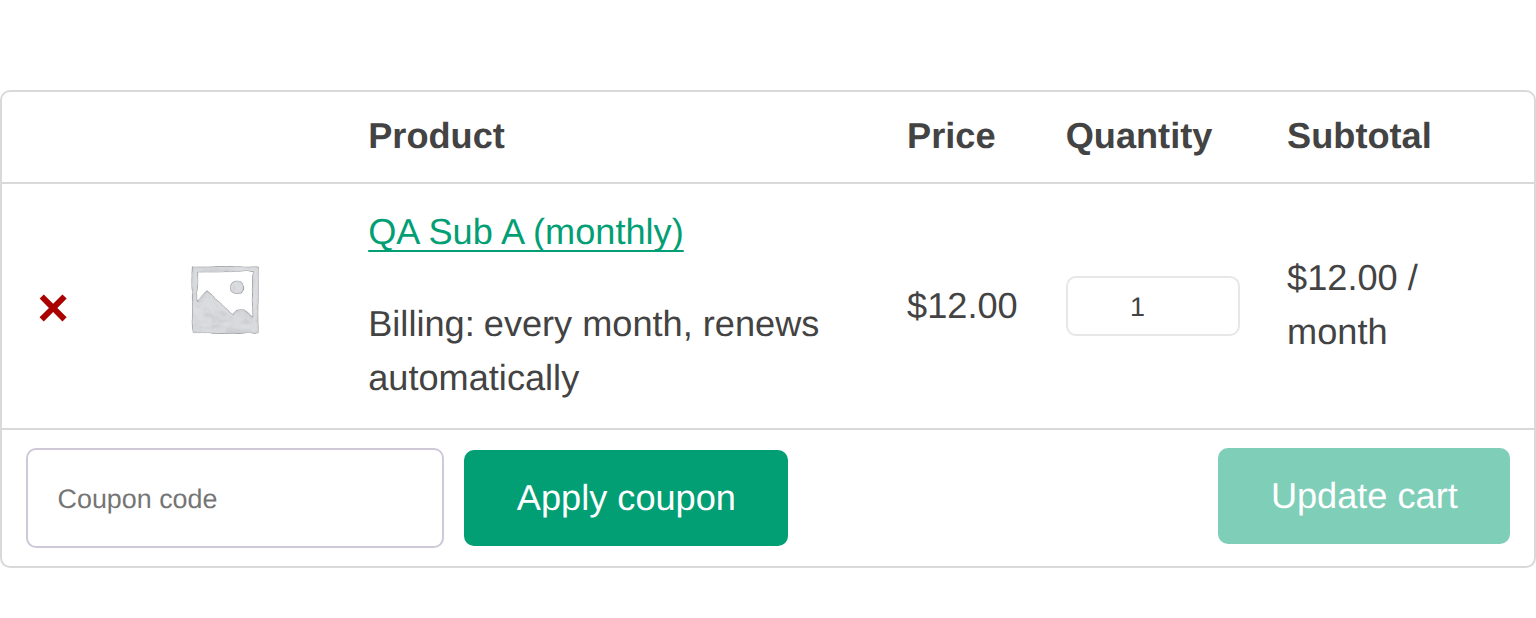
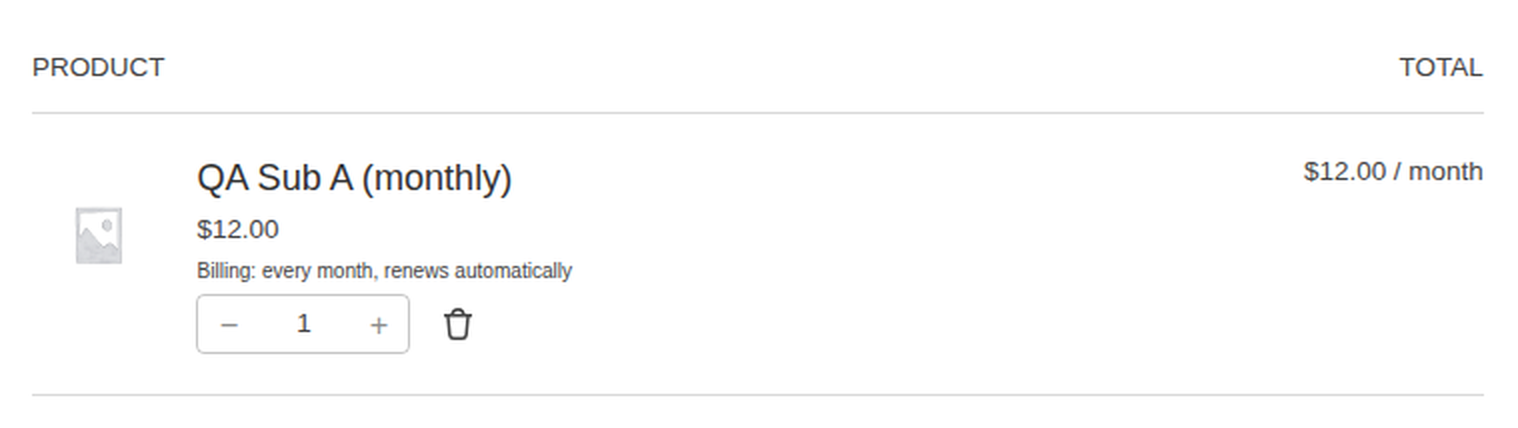
- Cart and checkout — a "Billing: every month, renews automatically" row under the product, on the classic and block cart and checkout. The line total carries a "/ month" suffix on both too, so it reads "$12.00 / month". The wording follows the cycle: "every 3 months", "every year". The Mini-Cart block does not show the suffix yet.
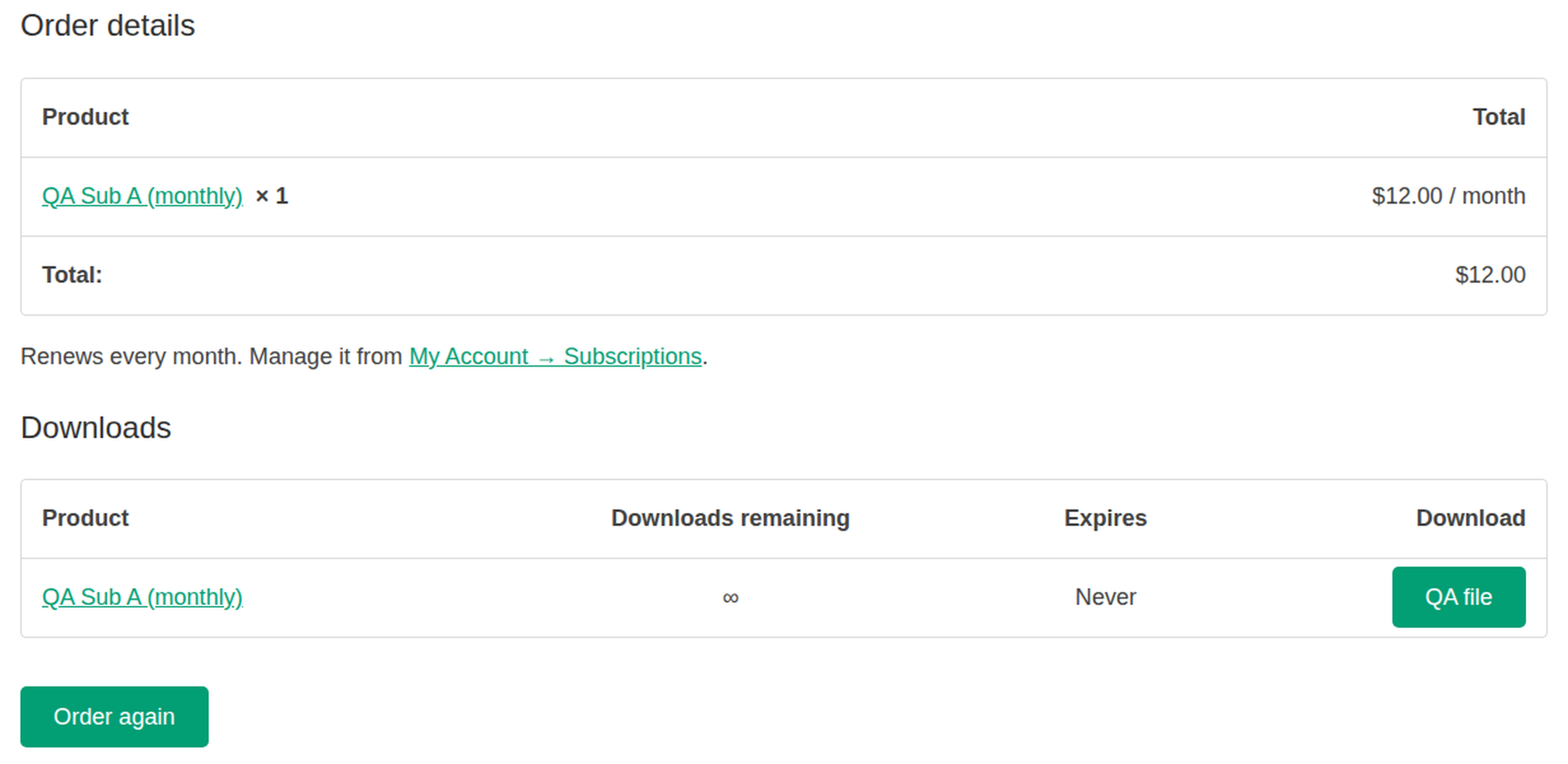
- Thank-you page — the recurring lines carry the suffix, and directly under the order table, above the Order again button, a line reads "Renews every month. Manage it from My Account → Subscriptions." A guest sees "Use the link in your Paddle receipt to manage it" instead.
- Order emails and My Account → Orders — the first order's recurring lines carry the suffix. A renewal order's thank-you page says which order it renews.
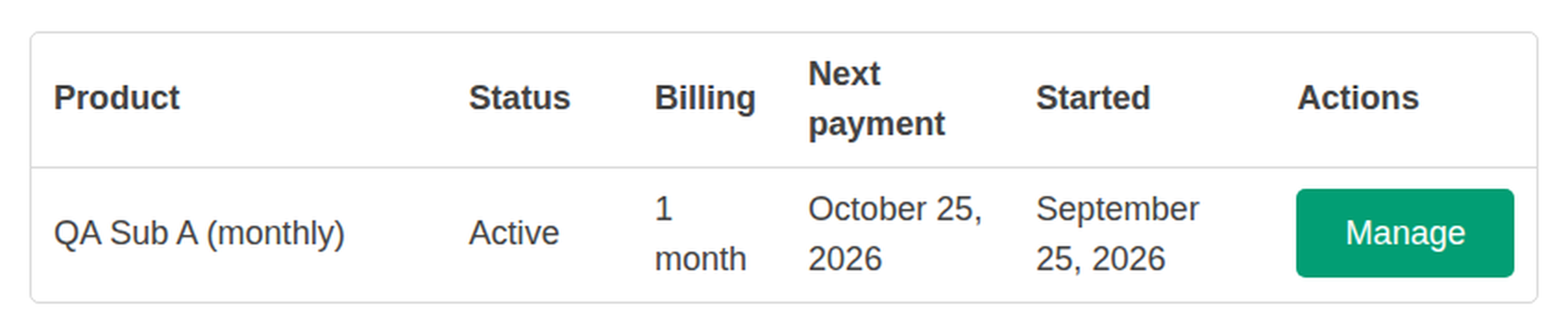
- My Account → Subscriptions — one row per subscription: product, status, billing interval, next payment and start date (in your store's date format, such as "October 25, 2026"), and a Manage button under Actions that opens the Paddle customer portal. An empty cell, such as Next payment on a canceled subscription, shows a dash. Cancelling, pausing and card updates happen in the portal; the tab has no forms of its own.
- The My Account menu — for a customer with a subscription, the Subscriptions item takes the place of Manage Billing, since both open the same Paddle portal. Customers without one keep Manage Billing. To show both items, add
add_filter( 'pimipay_paddle_account_hide_manage_billing', '__return_false' );
Renewals as linked orders
When Paddle charges a renewal it sends a transaction.completed
event for it. The plugin recognises it as a renewal, finds the original order by subscription ID, and:
- creates a new WooCommerce order (
created_via=paddle_renewal) for the recurring lines only, with the customer and addresses copied from the original. A one-time product bought in the same checkout is not repeated. - marks it paid with the renewal's Paddle transaction ID and stores the Paddle totals on it, the same way a first payment is recorded.
- links it to the original order and adds a note there: "Renewal order #N created from Paddle transaction txn_…".
- does not send WooCommerce's "completed order" email for the renewal, because Paddle already emails the receipt. Return
truefrom thepimipay_paddle_send_renewal_emailsfilter to send it anyway.
A renewal delivered twice creates one order. A failed renewal attempt (Paddle's
transaction.past_due or
transaction.canceled with a subscription origin) only
adds a note to the original order; no failed order is created. Card updates and plan changes made in the Paddle
portal produce transactions of their own (a card update is a zero-value one); those are noted on the original
order and never become orders.
On the order screen
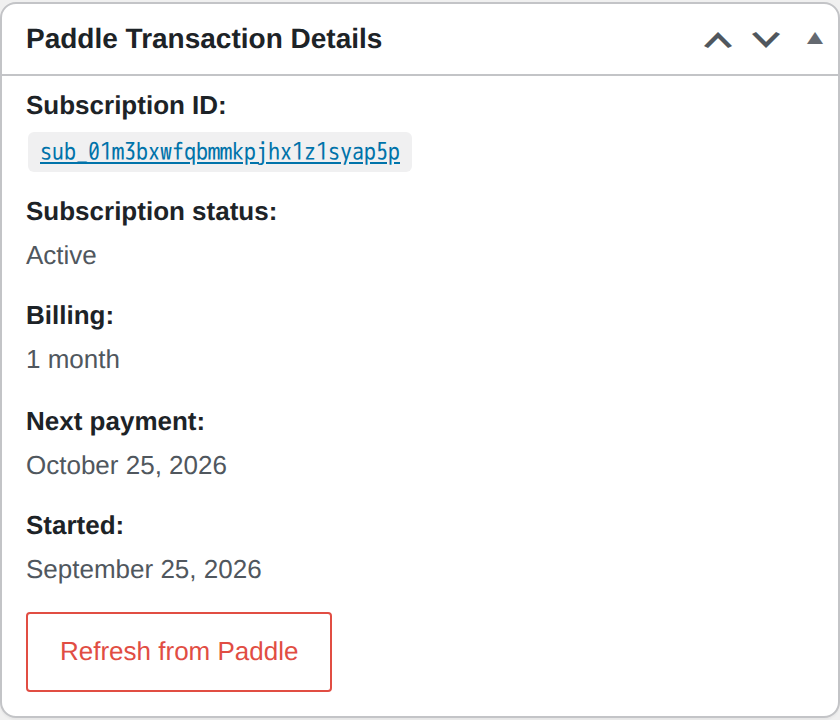
The original order's Paddle panel gains a subscription block: the subscription ID linked to the Paddle dashboard, its status, billing interval, next payment and start date, its renewals, and a Refresh from Paddle button that re-reads the subscription from the API and rewrites the block. A renewal order's panel says "Renewal of order #N" and links back. Both classic and HPOS order screens.
On the orders list
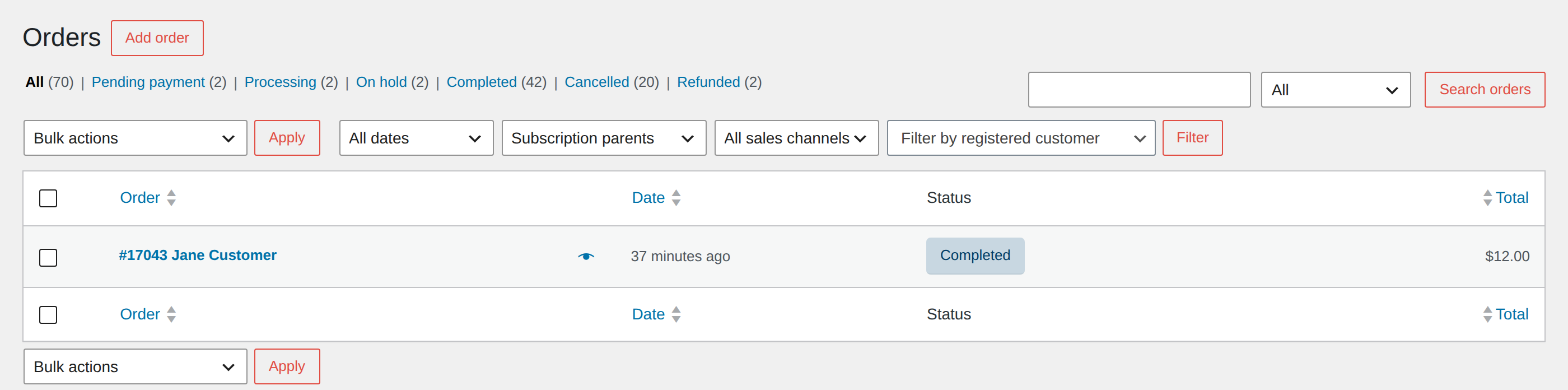
A Filter by subscription dropdown in the filter row shows only subscription parents (the original orders) or only renewals, on both order storages.
Cancellation and download access
Every subscription status change Paddle reports (trialing, active, past due, paused, canceled) is written to the original order with one order note per change. What follows from it:
- Canceled — download permissions for the recurring products are removed from the original order and every renewal order. A one-time downloadable bought in the same order keeps its download; it was paid for outright.
- Active again after canceled — those permissions are granted back.
- Past due or paused — access is kept. Paddle is still retrying the card, or the subscription was deliberately paused; revoking here would punish a card hiccup.
- Order statuses never change because of subscription state. A completed order stays completed.
Developers can hook pimipay_paddle_subscription_status_changed
(order, old status, new status, Paddle subscription data) to drive a licensing or membership system from the
same change.
Turning it off later
Once at least one subscription is live, a bold warning shows in full under the setting, on its own line: "N subscriptions are live on this store…". Untick it anyway and:
- Paddle keeps billing every existing subscription. Nothing on your site can stop that; cancel them in the Paddle dashboard if that is what you want.
- Renewals stop being recorded as orders. The events still arrive and are logged as handled, but no order is created and no note is added.
- Recurring products can no longer be bought with Paddle. They keep their recurring meta and price, the Billing field is hidden, and a sync is refused with a notice rather than quietly turning the product into a one-time one. Turn the setting back on to sell them again or to change them back to one-time.
- The My Account tab and the admin UI disappear; the subscription events stay registered at Paddle, harmlessly.
Current limitations
- Simple virtual products only. No recurring variations, nothing shippable, and a product is never both one-time and recurring.
- One billing interval per cart, as described under Checkout.
- No coupons on recurring lines. Paddle's own discount codes, entered in the Paddle checkout, are Paddle's to apply and are not reflected in WooCommerce.
- No cancel, pause, plan change or quantity change from WooCommerce. The customer uses the Paddle portal; you use the Paddle dashboard. Any change made on the WooCommerce side alone would make the two systems disagree about the amount, which is exactly what the design avoids.
- Trials are not supported. A Trial days field exists but is hidden unless the
pimipay_paddle_enable_trialsfilter returns true. Do not enable it on a live store: a trial records the first WooCommerce order at the full price while Paddle charges nothing that day, so your reports would show a payment Paddle never took. Trials done properly are on the roadmap. - No WooCommerce Subscriptions compatibility, no proration, and no subscription emails of the plugin's own.
Webhook events
With Subscriptions on, the plugin also listens for these eight events and adds them to your registered Paddle webhook automatically, on the next admin page load after you save the setting:
subscription.created subscription.activated subscription.trialing subscription.updated subscription.past_due subscription.paused subscription.resumed subscription.canceled
Renewal payments arrive as the ordinary transaction.*
events, which were already subscribed. Events are applied in the order Paddle says they happened, so a late
delivery can never revert a cancellation, and a delivery for the wrong Paddle environment is refused and shown
in the webhook health panel. With the setting off, subscription events that still arrive are logged and counted
as delivered; they are not failures.