How subscriptions work with Paddle and WooCommerce
PimiPay does not schedule charges or store cards. Paddle does both, as it already does for the software companies that sell through it directly. The plugin's job is to tell Paddle which products recur and to record what Paddle then does, inside WooCommerce.
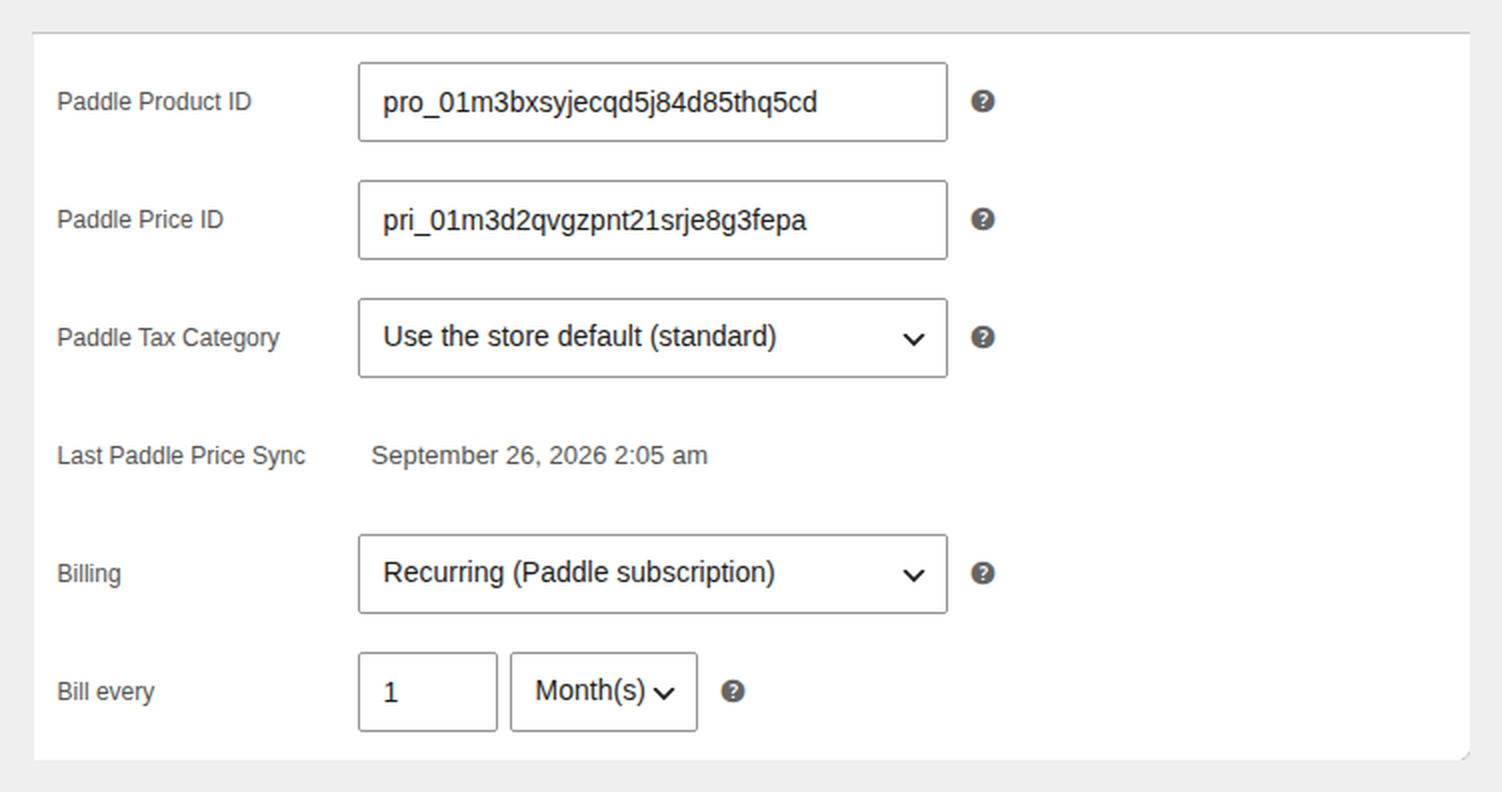
- Set Billing to Recurring on a simple virtual product, in the Paddle tab of the product editor. Pick how often it bills: every 1 to 365 days, weeks, months or years.
- Sync the product. The plugin creates a recurring price in Paddle with that billing cycle, the same way it syncs a one-time price today.
- Paddle creates the subscription at checkout. The customer pays in the Paddle checkout on your order-received page, as with any PimiPay order. Because the price is recurring, Paddle opens a subscription, and the plugin stores its ID on the order.
- Renewals arrive as linked orders. Every time Paddle charges the renewal, the plugin creates a new WooCommerce order for the recurring items, marks it paid with the Paddle transaction ID and links it to the original. Download access for the recurring products follows the subscription: revoked when Paddle cancels it, restored if it is reactivated.
Paddle is the merchant of record for every one of those charges, so tax on each renewal is calculated, collected and filed by Paddle, and the receipt the customer gets is Paddle's. The step-by-step version is in the Subscriptions set-up guide.
Without WooCommerce Subscriptions
Most recurring billing on WooCommerce is built one way: the WooCommerce Subscriptions extension schedules the charge, and the payment gateway tokenises the card so the extension can charge it later. That is why the other Paddle gateways for WooCommerce we compared in September 2026 list "subscriptions" as a feature and then require the extension, which costs $279 a year at woocommerce.com at the time of writing.
PimiPay is built the other way round. Paddle schedules the charge and holds the card;
WooCommerce records the result. The WooCommerce Subscriptions extension is not
installed, not required, and not compatible: a product of its subscription
type hides Paddle at checkout, because there is nothing Paddle could bill for it. If
you are comparing Paddle plugins, the question to ask is
who bills the subscription,
because it decides which system's numbers you trust when the two disagree.
What your customer sees
A recurring product is labelled as one from the cart onwards, so nobody reaches the Paddle checkout without knowing they are subscribing.
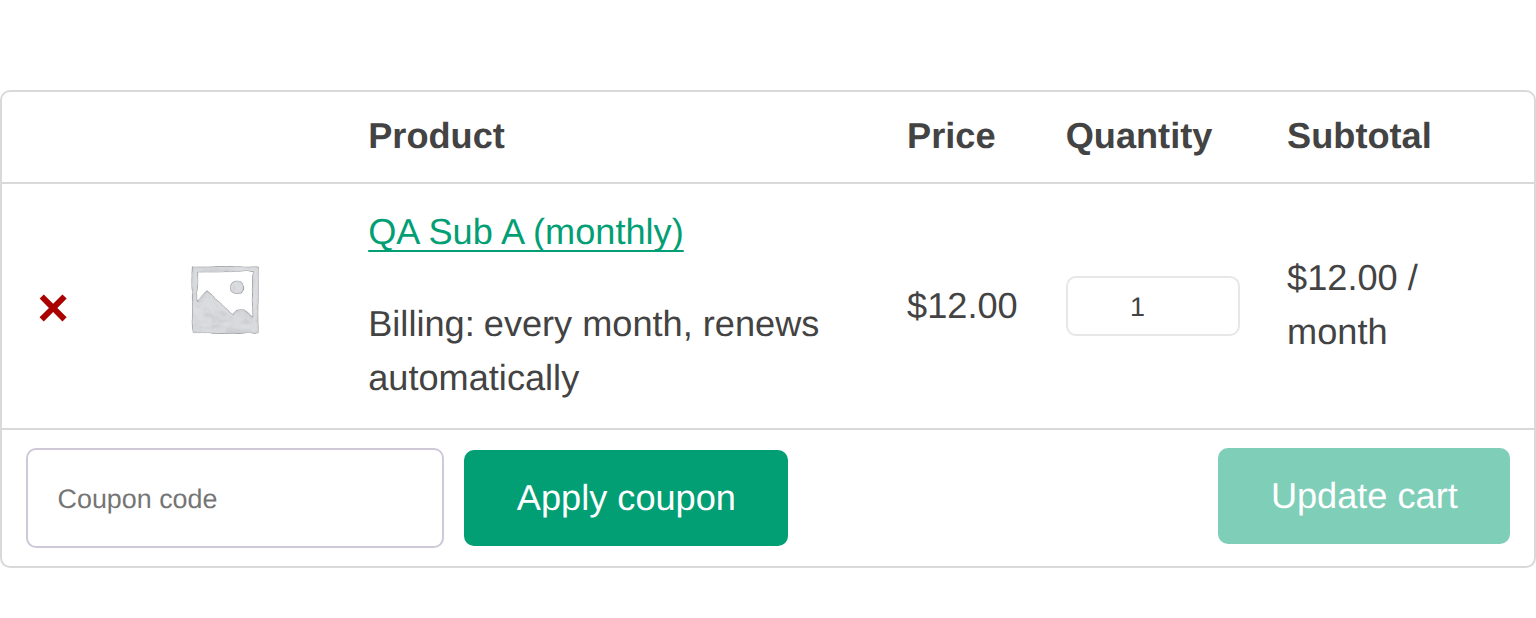
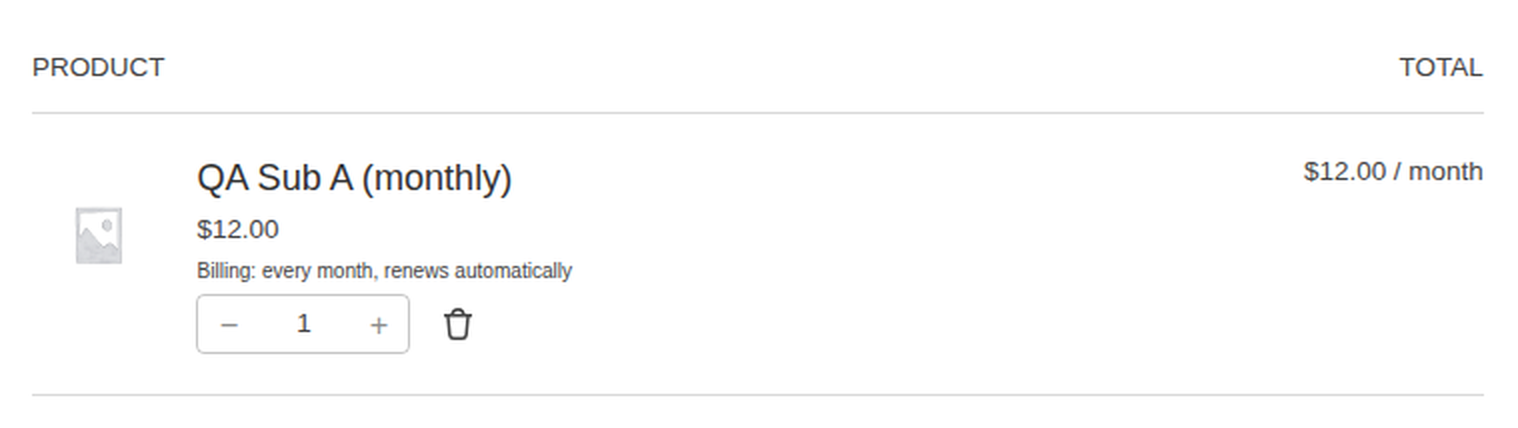
- The cart and checkout show a "Billing: every month, renews automatically" row under the product, and the line total reads "$12.00 / month", on the classic cart and checkout and on the Cart and Checkout blocks.
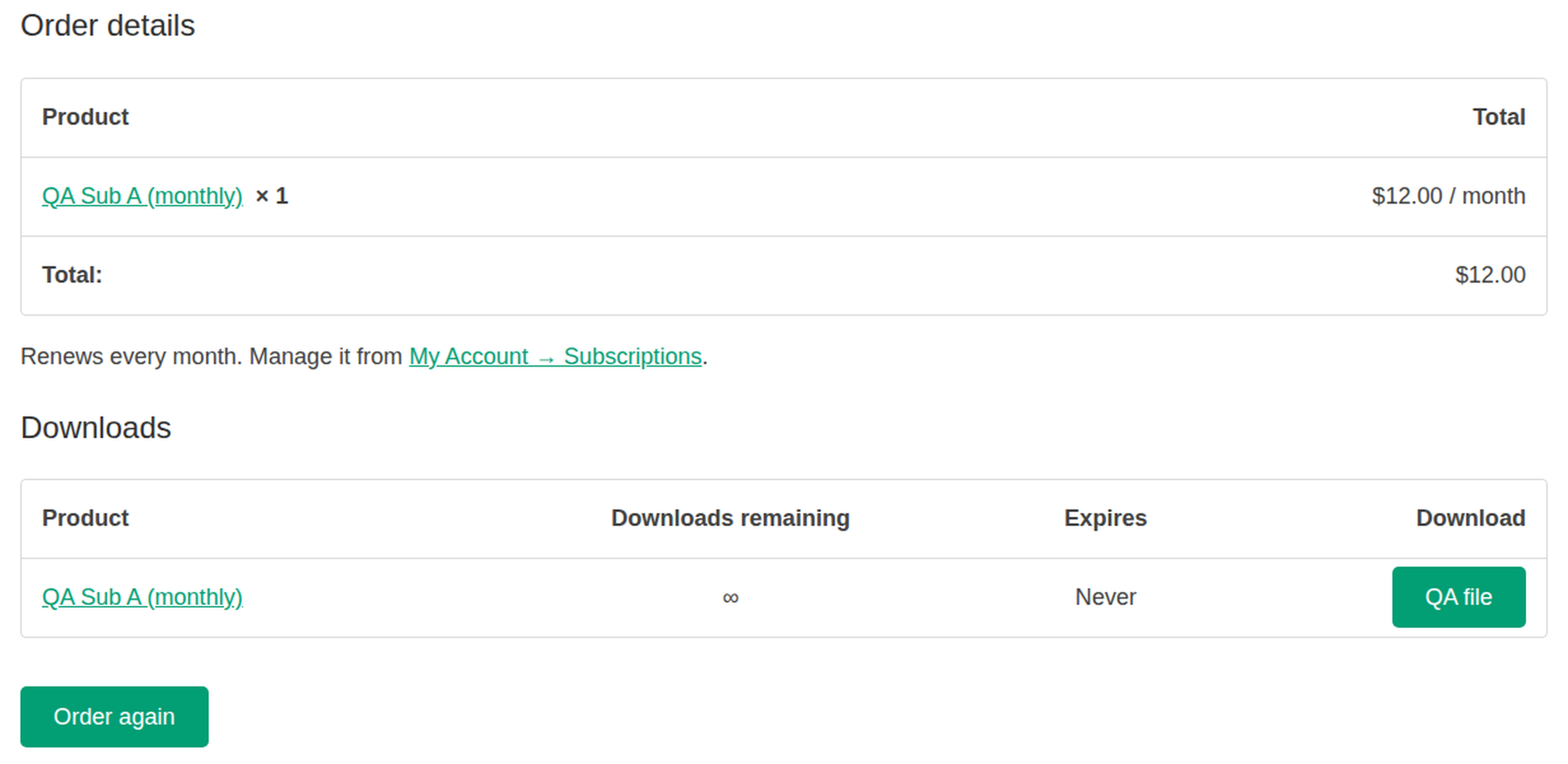
- The thank-you page says "Renews every month" with a link to My Account → Subscriptions, and the order's lines carry the "/ month" suffix there, in My Account and in the order email.
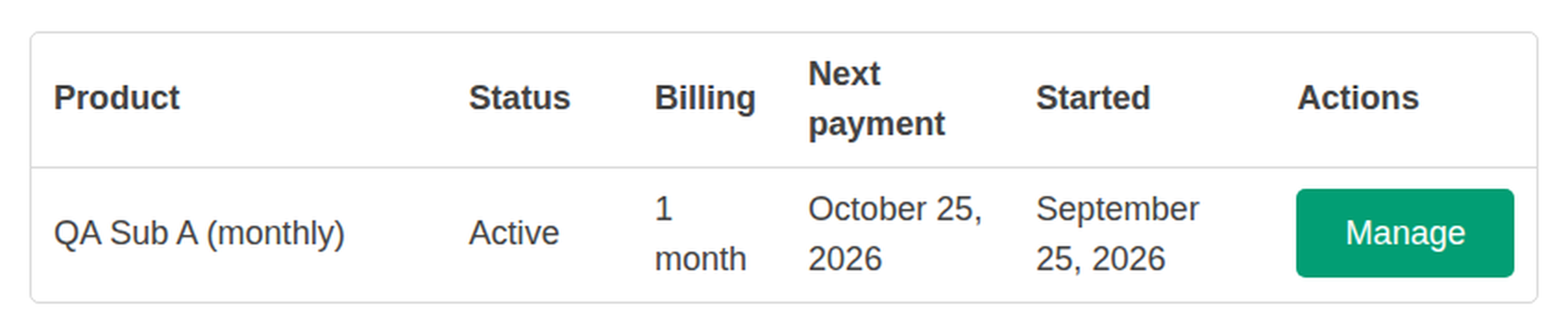
- My Account gains a Subscriptions tab listing each subscription with its status, billing interval, next payment and start date. For these customers it takes the place of the Manage Billing menu item, since both lead to the same portal.
- The Manage button on that tab opens the Paddle customer portal, where cancelling, pausing and card updates happen. The tab lists; Paddle's portal acts.
What you see in the admin
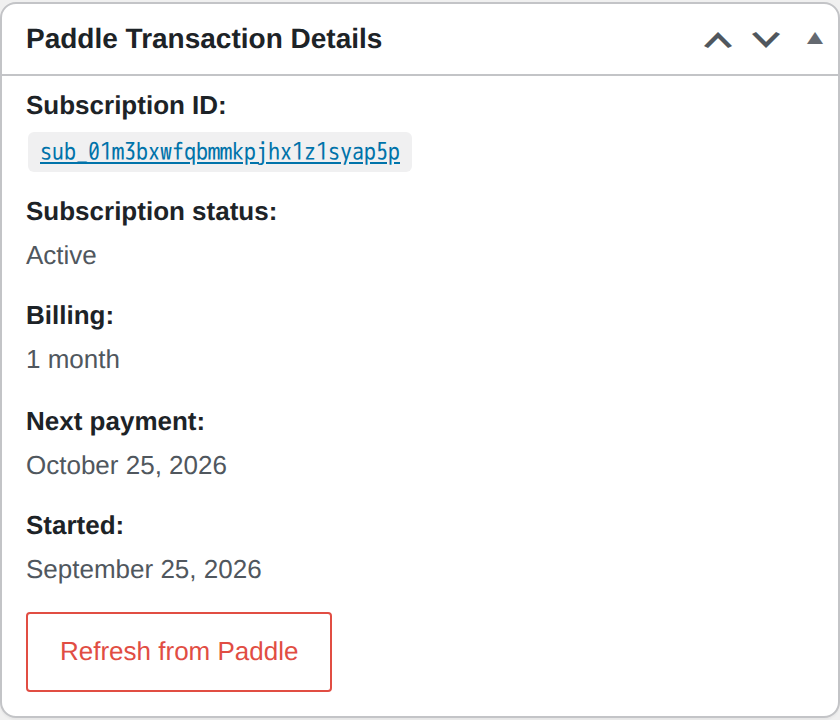
The original order is the record. Its Paddle panel shows the subscription's ID (linked to the Paddle dashboard), status, billing interval, next payment and start date, with a Refresh from Paddle action that re-reads the subscription from the API if you want to check it without waiting for the next webhook. Renewal orders show which order they renew, and the parent lists its renewals.
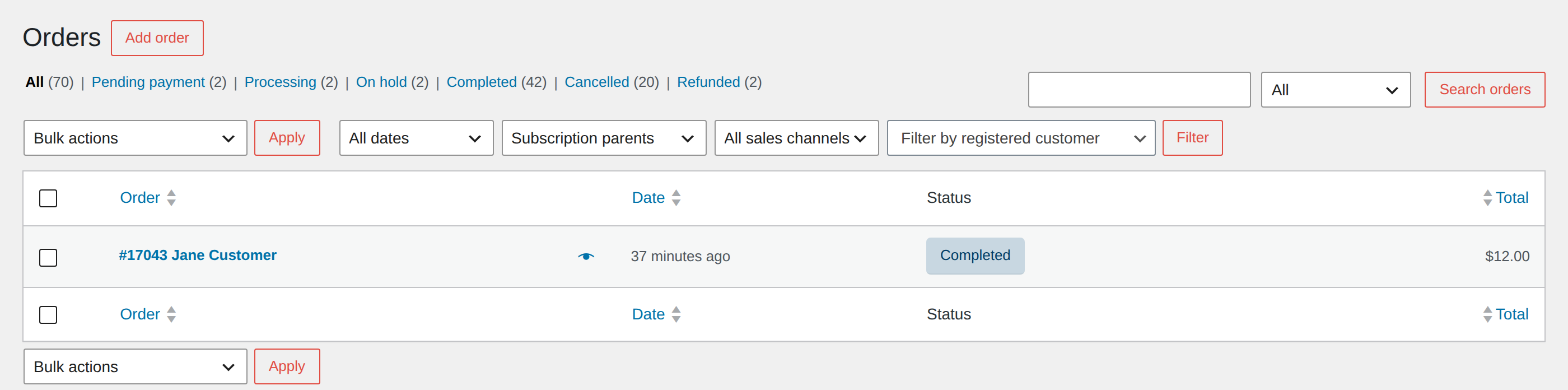
The orders list gets a "Filter by subscription" dropdown so you can see only the original subscription orders, or only their renewals, on both the classic and HPOS order screens.
The feature is a single checkbox under WooCommerce → Settings → Payments → Paddle, off by default. Before you turn it off again, the setting tells you how many subscriptions are live on the store, because Paddle keeps billing them either way.

What it does not do yet
Recurring billing is new in PimiPay, and it is deliberately narrow. Read this list before you buy for a subscription business.
- No free trials. The trial field exists but is hidden, because a trial would record the first WooCommerce order at full price while Paddle charges nothing that day.
- No cancelling, pausing or plan changes from wp-admin or WooCommerce. Customers do that in the Paddle customer portal; you do it in the Paddle dashboard. The plugin records the result.
- Simple virtual products only. Variable products and anything that needs shipping stay one-time. A product is either one-time or recurring, never both.
- No coupons on recurring lines. A recurring line is always billed at its synced Paddle price. If a coupon reduces one, Paddle is not offered at checkout; the classic checkout explains why and asks the customer to remove the coupon.
- One billing interval per cart. One-time and recurring products can share a cart, but all recurring items in it must bill on the same cycle, because Paddle creates one subscription per checkout.
- No WooCommerce Subscriptions compatibility, and no subscription emails of its own. Paddle sends the receipts and the payment-failure reminders.
What comes next is on the roadmap, without dates. If your business depends on any item above today, do not buy on the assumption it lands soon.
What it costs
Subscriptions are part of the one PimiPay licence, $59 a year for one site, with a 30-day refund window. There is no subscription add-on to buy. Paddle charges its own fee on each transaction, renewals included, at its published rate; how that compares with a Stripe stack is worked through in Paddle vs Stripe for WooCommerce.
Frequently asked questions
Can I sell subscriptions in WooCommerce without the WooCommerce Subscriptions plugin?
Yes, if you sell through Paddle. Since PimiPay 2.0.0 you set a simple virtual product's Billing to Recurring, sync it, and Paddle creates the subscription at checkout and charges every renewal itself. WooCommerce does not need the WooCommerce Subscriptions extension or any other add-on, and each renewal is recorded in WooCommerce as its own order linked to the first one.
Does Paddle work with the WooCommerce Subscriptions extension?
Not through PimiPay, and you do not need it to. PimiPay uses Paddle as the subscription engine, so a product of the WooCommerce Subscriptions type is not something Paddle can bill, and the gateway hides itself when one is in the cart. Set the product's Billing to Recurring in PimiPay's own Paddle tab instead.
How do Paddle subscription renewals show up in WooCommerce?
Each renewal becomes its own WooCommerce order. When Paddle charges a renewal, PimiPay creates a new order for the recurring items, marks it paid with the Paddle transaction ID, and links it to the original order. The original order's screen lists its renewals, and the orders list can be filtered to subscription parents or renewals. WooCommerce's own "order complete" email is not sent for renewals because Paddle already sends the receipt.
How do customers cancel or pause a Paddle subscription bought through WooCommerce?
In the Paddle customer portal. My Account → Subscriptions lists each subscription with its status, billing interval and next payment, and each row's Manage button opens the portal, where the customer can cancel, pause or update the card. Nothing is changed from WooCommerce itself, which is what keeps the amount Paddle charges and the amount WooCommerce records identical.
What happens when a subscription payment fails?
Paddle retries the card and sends its own reminder emails; PimiPay adds a note to the original order and leaves the customer's download access in place while the subscription is past due. Only when Paddle marks the subscription canceled does PimiPay remove download access for the recurring products, and it restores that access if the subscription is reactivated. Order statuses are never changed by subscription state.
Can I offer a free trial on a Paddle subscription in WooCommerce?
Not yet. The trial field exists in the code but is hidden, because a trial would record the first WooCommerce order at the full price while Paddle charges nothing that day. Trials are on the roadmap; do not buy on the assumption they arrive by a given date.
Which billing intervals does Paddle for WooCommerce support?
Daily, weekly, monthly or yearly, every 1 to 365 periods, so "every 3 months" or "every 2 weeks" are fine. A cart can hold one-time products alongside recurring ones, but all recurring items in one cart must share the same interval, because Paddle creates one subscription per checkout.
Can a WooCommerce product be sold both one-time and as a subscription?
No. A product is either one-time or recurring. If you want both, create two products. Recurring billing is also limited to simple virtual products: variable products and anything that needs shipping stay one-time, which matches Paddle's own rule that it is a merchant of record for digital goods.
Do WooCommerce coupons apply to Paddle subscriptions?
Not to the recurring items. A recurring line is always billed at its synced Paddle price, so if a coupon reduces one, Paddle is not offered at checkout; the classic checkout explains why and asks the customer to remove the coupon. Coupons still work on one-time products in Order total pricing mode as before.
How much does it cost to sell subscriptions with Paddle in WooCommerce?
The PimiPay licence, $59 a year for one site, plus Paddle's own fee on each charge (5% + 50¢ at Paddle's published rate as of September 2026, renewals included). There is no subscription-plugin fee on top: the other Paddle gateways for WooCommerce we compared in September 2026 route recurring billing through the WooCommerce Subscriptions extension, which is $279 a year at woocommerce.com at the time of writing.
What happens if I turn the Subscriptions setting off in PimiPay?
Paddle keeps billing every existing subscription; nothing on your site can stop that. Renewals stop being recorded as WooCommerce orders, recurring products can no longer be bought with Paddle, and the My Account tab disappears. The setting shows how many subscriptions are live on the store before you untick it.
More in the Subscriptions section of the FAQ, and the release notes.